
Social media
Last updated:
18 August 2025
Everything we post on social media reflects our brand, from the copy we write to the music we choose.
With over 1,200 UAL social media accounts, it's likely there's already an account that meets your users' needs.
Staff need permission to launch any new social media accounts — visit our digital governance page on Canvas to find out more (UAL staff login required).
Bio
- Include topline information at the start.
- Use line breaks to make it easier to read.
- Avoid overusing hashtags. Only apply hashtags most relevant to your account.
- For central accounts, use copy from our brand narrative that fits the channel’s word count.
- College-specific accounts should include copy from their individual narratives.

- If the account is managed by UAL Communications teams, state the relationship to UAL within the account’s bio and signpost to UAL’s central account. This helps audiences understand which accounts are official and which aren’t.
Example: Camberwell College of Arts, part of @unioftheartslondon.
- For accounts not managed by UAL Communications teams such as course accounts, we recommend you state the relationship to the College/Institute’s official account.
Example: MA Fashion Womenswear and Menswear, taught at @lcflondon_.
- Where possible, write out your name in full with acronyms in brackets to follow.
Example: Central Saint Martins (CSM).

Accessibility
Alt text and image descriptions
Alt text, or alternative text, is a brief description of an image that helps people understand the image's content:
- It's intended to help people with visual impairments access visual content, but it can also benefit all users.
- This is different to a content caption. Where alt text is not available, use the content caption to include this information.
- Infographics and other images containing a large amount of information should have alt text, but also offer a text alternative.
Audio description
Use audio description on all video content which is embedded on the UAL website or digital systems to adhere to WCAG accessibility regulations.
UAL Staff can access guidance on how to create audio descriptions on Canvas (UAL staff login required).
Captioning and subtitles
Captioning videos benefits everyone. You can caption videos through:
- uploading an SRT file for closed captioning, if available. This is the best option for accessibility as users can turn captioning on/off as they need.
- burned in captions by using our branded caption templates and PrText Styles which allow you to easily style your captions using our house style and correct aspect ratio positioning. These are available in multiple formats, including 1:1, 4:5, 9:16 or 16:9.
- auto-generated captions, which generate captions automatically from the video file you upload. This however will need some manual editing as some words aren’t always transcribed correctly.
- in-app captioning, which is available on some social media platforms. Use a sans serif font that’s closest to Helvetica Neue and left-align all text. Ensure text is black or white, depending on which is more legible.
Filters and effects
Filters and effects may alter the way the original content is viewed. Use them sparingly, unless they have been developed in-house for specific content. Always consider accessibility within use.
Fonts and colours
For more reactive content not using our branded templates where you may need to use in-app editing features for text overlay instead, follow these guidelines:
- Fonts: use sans serif fonts that align best with our primary typeface, Helvetica Neue.
- Font size: consider the size you position the font if applying it manually to make sure it's accessible.
- Alignment: make sure the text is left-aligned.
- Placement: place the text where it's most legible and doesn't interrupt the content.
- Font colour and highlight: use black or white fonts with opposing highlight colour.

GIFs
For accessibility reasons, use GIFs sparingly and ensure that your accompanying content conveys the message you want to communicate.
If you’re using a GIF, make sure it:
- has alt text
- doesn’t flash for longer than 3 times per second
- doesn’t loop and can be stopped or paused.
Crediting and tagging
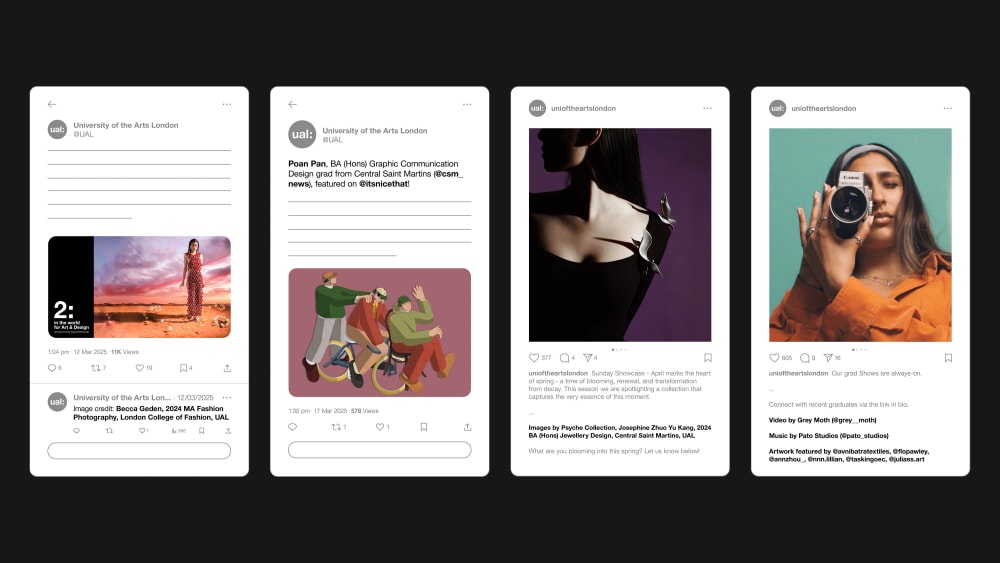
- Credit and tag any collaborator or owner of work featured in the content you post.
- When crediting student work: [Student/artist’s name] [(@student/artist handle)], [year and course], [@College handle], UAL | Photograph: [photographer's name]
- For videos created by external agencies, credit the primary contributor first, followed by any other key contributors such as an animator.
- When crediting work from external suppliers: [Medium] by [Supplier name] [(@supplier handle)], [Second medium] by [Supplier name] [(@supplier handle)]
- On X, mention the full credits in a thread or tag the handles of the creator/s.
Editorial
Abbreviations and acronyms
- Use with caution as they aren't accessible to all audiences.
- Consider people whose first language isn’t English. Only use abbreviations and acronyms that are commonly understood by wider audiences such as 'ad' rather than 'advertisement' and 'DM' rather than 'direct message'.
- If the abbreviation is a shortened word, use the full word instead to avoid any confusion such as 'really' instead of 'rly'.
- If it's a less common acronym, write out the definition on first use, so it's clearly understood. Any mentions of the acronym after do not require a definition.
Example: Check out the work of our Undergraduate (UG) students at this year's summer Shows! There's still time to book your place at the private view for our UG Class of 2025 exhibition at @LCFLondon_.
Jargon and slang
- Use simple, clear language that can be understood by all. This allows us to reach more audiences.
- There are a few exceptions. For instance, if you’re trying to reach a specific audience who are familiar with specific jargon/slang or if quoting someone.
Emojis
- Only use emojis to enhance the message you are sharing.
- You can also use emojis to break up text and make long captions easier to read.
- Avoid using emojis to replace words as this can be read and interpreted differently for screen readers.
- Use emojis sparingly to avoid misinterpretation as some may have different meanings for different audience groups.
Hashtags
- Hashtags should support your message, but not lead it.
- For accessibility, we should use camel case when writing hashtags.
Example: #UniversityOfTheArtsLondon
- When referencing your College, Institute or campaign, don't use an acronym in a hashtag unless you have established their context first.
Example: At Central Saint Martins (CSM), we believe that art, design and performance can generate real, productive change. #CSM
Music and audio
Music should be used to support visual content. However, for accessibility reasons, it should not lead the content. Use captions and audio description to communicate the audible element.
Music
- Select music which is royalty free and you have a license to use.
- If you are posting organically through channels with existing music libraries, make sure your account is set to a Business or Professional account to ensure you're only using music permitted for commercial use.
- Use instrumental tracks, unless you're sharing student work which includes lyrics. Using music with vocals can create accessibility concerns and affect the tone of the content through the language used and connotations of phrases.
- If you commission a music producer or sound designer to score a track for your production, remember to share our brand guidelines with them.
Original audio and voiceovers
- Although ‘Original Audio’ is popular on some channels such as TikTok, we don't recommend using it as we don't know the source or context.
- If you want to include a voiceover in certain videos as part of the concept or tone, follow our guidelines on captioning above.
Paid partnerships
Hiring current students or graduates
- When hiring a current student or graduate through UAL Arts Temps to create content for us, please consider the Student and Graduate Employment Policy (PDF 123KB) (UAL staff login required).
- Consider safeguarding measures and legal requirements (UAL staff login required) if the person you're working with is under the age of 18. Please contact Legal Services (UAL staff login required) for support on this.
- Share our guidelines for students and alumni using our brand.
Hiring influencers
- Consider how they align with our values. When selecting a content creator or influencer, consider that UAL is committed to addressing the under-representation of Black and Minority Ethnic (B.A.M.E.) individuals.
- A contract should always be in place to reflect what is expected from both parties. This includes large and small-scale arrangements, from a single post to a series. Influencers, or their agencies, often have their own contracts. You can either create a UAL contract that Legal Services (UAL staff login required) can prepare for you or follow the Purchase of Services checklist (UAL staff login required) to make sure their contract meets all legal requirements.
- If working with UAL Arts Temps, they will create a contract when you select their booking template.
Declaring partnerships
If you’ve paid someone to create or share a piece of content on behalf of our brand, both parties need to follow the Advertising Standards Agency (ASA)’s guidance on declaring the partnership to be compliant with the law. This applies for both working with other brands, paid ads or influencer marketing and also includes if the transaction was something other than money (such as a discount).
- If the content is posted outside of UAL-owned channels, paid-for endorsements should use clear labels like #Ad or #Advert.
- If the content is only posted on UAL-owned channels, you don't need to declare it as an ad.
- Research whether the other party has been routinely found to breach the ASA’s advertising requirements.
- Get in touch with the Legal Services (UAL staff login required) team for advice or to request an influencer agreement if the content is posted on their own channel.
If a student independently creates a piece of content that we share, this is considered earned media and wouldn’t need to be labelled as being paid/ad.